
News · 24 April 2007
News / How to burn the mixes to CD - with separate tracks
The article
Here's a little tutorial so you can burn the mixes to CD with separate tracks
First of all you need burning software that supports .cue files
You can use Nero Burning - available here. Very easy to use, and it works on most PCs.
IMPORTANT : the .cue and .mp3 files must always be in the same folder; if the mp3 is on your desktop, the .cue must be too. Don't rename the mp3, keep the same name, otherwise the program will refuse to burn the CD.
How to burn .cue files with Nero :
If you launch Nero from your desktop,
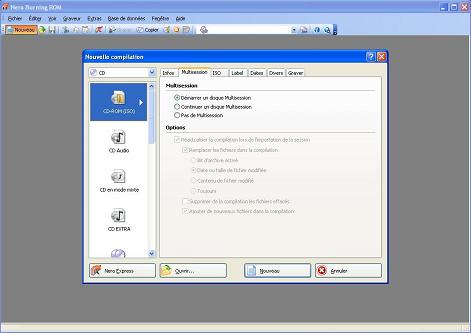
Either you get Nero Burning
- In that case, click Cancel (bottom right)
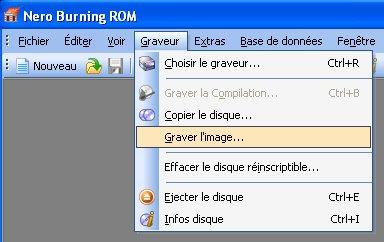
- then click Recorder (in the top menu) and Burn Image...
- A window will open
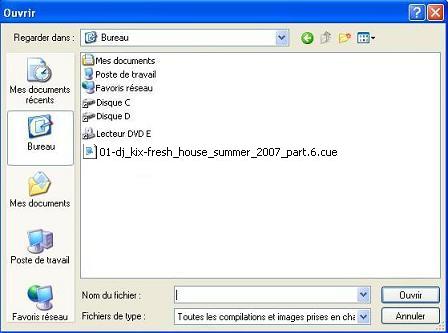
- Just select the .cue you downloaded from the site beforehand. In the example I downloaded 01-dj_kix-fresh_house_summer_2007_part.6.mp3 to my desktop, and I also downloaded the .cue to the desktop : 01-dj_kix-fresh_house_summer_2007_part.6.cue
Or you get Nero Express
- In that case, click Image,Project,Copy (bottom left)
- then click Disc image or saved project (in the right-hand menu)
- A window will open
- Just select the .cue you downloaded from the site beforehand. In the example I downloaded 01-dj_kix-fresh_house_summer_2007_part.6.mp3 to my desktop, and I also downloaded the .cue to the desktop : 01-dj_kix-fresh_house_summer_2007_part.6.cue