
 Fresh House Winter 2008 Part.1
News · 8 December 2007
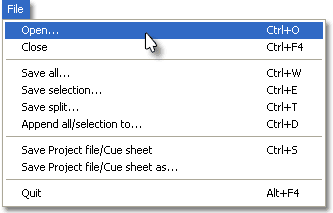
Fed up with having a single MP3 that runs over an hour? Tired of always listening to the beginning and never hearing the end? Here's a little tutorial showing you how to split a mix into several tracks.
Mp3DirectCut is a small free program that lets you change the volume of your MP3s, cut them, remove certain parts...
All without having to decompress your MP3 to Wave format.
Official site (for other versions such as Mac):
Mpesch3.de
Soundforge to download the file

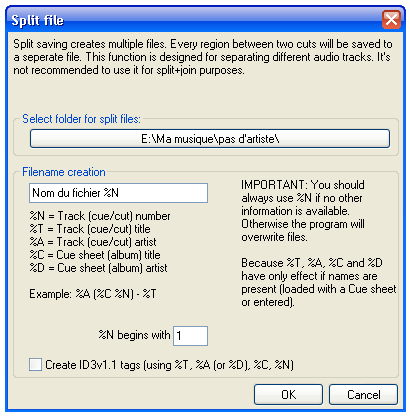
There you go, your MP3 is now split and ready to be played as several tracks
indépendantes !!
If you have a Mac, you can take a look at Cue-splitter.
It's free and does exactly the same thing.
You'll find it at the following address:
http://www.macmusic.org/software/version.php/lang/fr/id/4040/

Comments (6) — archive, in French
Merci !!! Mais y'a-tu une version pour mac ??? :)
pour linux, mac et autres : mp3splt.sourceforge.net/m...
merciiiiiiiiii bcp l'ami c tré agreable ton logiciel
Salut à tous, alors, pour completer le mode d'emploi de kix, je vous informe qu'avec Nero c'est encore plus simple, il vous suffit de selectioner les deux fichiers *.mp3 et *.cue, de faire un clik droit dessus, choisissez "ouvrir avec..." et là , chercher le Nero. Executer, et hop, il ne vous pose pas de question, à part, "voulez vous graver ce fichier. voila :) @++
Bonjour, je m'interesse a ces bon mix, mais mon but es de pouvoir les récupérer pist par pist ... Hélas je n'y arrive pas avec les programmes proposés! :( Pouvez vous me renvoyer a d'autres tuto ou m'aider un peu! :S Merci, et merci a Kix pour ce bon son que j'apprécie tant! ;)
Juste pour info, je découpe ces fichiers avec foobar2000, bon ça nécessite réencodage (donc perte de qualité même très très minime) mais ça le fait très bien! (et les fichiers sont nommés et taggés comme il faut)...